
Make Carousels Work for You: A Guide to Better Retention
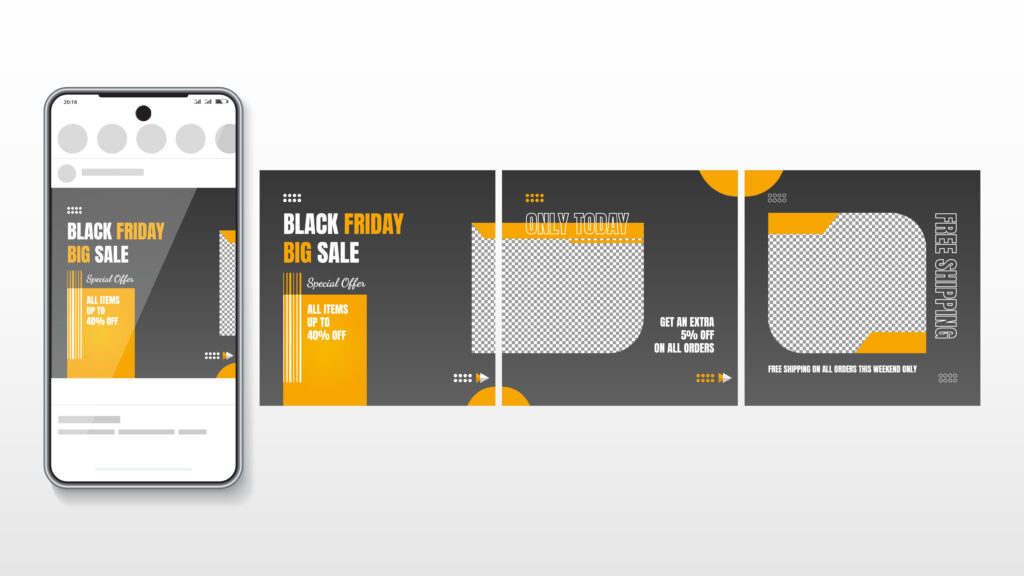
Ah, carousels—the unsung heroes of keeping people hooked online. You’ve seen them everywhere, right? Those swipeable slides on social media or websites that feel like they’re saying, “Hey, stick around for just one more!” They’re the digital equivalent of the friend who always has one more juicy story at the end of the night. You can’t help but keep listening—or in this case, scrolling.
Carousels are kind of like a cheat code for grabbing attention in a world where we’re all scrolling at the speed of light. They don’t just throw everything at you all at once; they take their time, serving up bite-sized pieces of info that are easy to digest. It’s like being at a buffet—small plates keep you coming back for more instead of overwhelming you with a mountain of food. Except in this case, the buffet is content, and you’re getting hooked with every swipe.
And let’s be honest, carousels work because they’re interactive. People love swiping, tapping, or clicking—it’s practically a reflex at this point. Toss in some eye-catching visuals, and boom, you’ve got someone’s attention longer than you thought possible. It’s basically magic, but with a sprinkle of psychology and good design thrown in for good measure. So, yeah, carousels aren’t just slideshows—they’re your ticket to making people actually stop and pay attention.
Benefits of Using Carousels
Okay, so here’s the deal—carousels are like the overachievers of the content world.
They don’t just sit there looking pretty; they actively pull people in. It’s like they’ve mastered the art of seduction but for information. Instead of overwhelming someone with a wall of text or a flood of images, carousels break things down into snackable bites. People love that. It’s like saying, “Hey, no pressure, just take this one piece at a time.” And guess what? It works.
One of the coolest things about carousels is how they guide the viewer’s attention exactly where you want it. Each swipe is intentional, and it keeps people engaged longer than if they were just staring at a single image or block of content. It’s kind of like handing out a really good book chapter by chapter—you’re leaving them curious and craving the next bit. Plus, they give you room to get creative. You can show off products, share tips, or tell a story—all in a way that feels interactive and fun, not pushy.
And let’s not forget that carousels basically come with built-in staying power. They give viewers a reason to linger and actually absorb the info instead of just doing the usual “scroll, scroll, gone” routine. If you’re trying to keep someone’s attention, they’re your MVP every single time.
Design Principles for Effective Carousels
Let’s get real—if your carousel looks like a cluttered junk drawer, no one’s sticking around to swipe through it.
The key here? Keep it clean, keep it classy. Think bold visuals that pop but don’t scream at you. Nobody needs a sensory overload. Use colors that play nice together, but make sure your text doesn’t get lost in the mix. Ever tried reading pale yellow text on a white background? Yeah, don’t do that.
Typography matters, too. Stick to fonts that are easy on the eyes—this isn’t the time to show off that fancy cursive font you found last week. And when it comes to text, less is more. A snappy headline or a few words can say way more than a novel squeezed onto one slide.
Oh, and spacing? It’s your best friend. Give your elements room to breathe. Cramming everything into one slide just makes it look like a hot mess. Think of it like hosting a dinner party—don’t overcrowd the table; let each dish shine.
Last but not least, make it swipe-worthy. Guide people through your content with a logical flow, like leading them down a scenic trail instead of dropping them in a maze. Each slide should feel connected to the last, so they can’t help but keep swiping to see what’s next.
Content Strategy for Carousels
You’ve got this awesome carousel ready to roll—now it’s time to figure out what goes on those slides.
First things first: keep it focused. Nobody wants to swipe through a random mishmash of unrelated stuff. Think of your carousel as a mini-story or a playlist—it should have a vibe, a purpose, and a logical flow. Whether you’re showing off your latest products or dropping knowledge bombs, every slide should serve a purpose and build on the last.
Now, let’s talk about grabbing attention. Your first slide is like a movie trailer—it’s gotta hook people in. Use bold visuals or a snappy headline to reel them in before they scroll past. Then, keep the momentum going. Break down your message so it’s bite-sized and easy to follow. Overloading one slide is like cramming too much into a suitcase—it’s just messy, and no one wants to deal with it.
And hey, don’t forget about variety. Mix it up with images, text, or even animations if you’re feeling fancy. The trick is to keep people curious about what’s coming next. Oh, and keep your tone relatable. Nobody’s hanging around for boring corporate speak, so keep it fresh, friendly, and fun. If your carousel feels like a conversation, you’ve nailed it.
Technical Considerations
Now, let’s talk tech stuff, but I promise to keep it chill.
First off, your carousel has to play nice with all screen sizes. Think about it—most people are scrolling on their phones while waiting in line or pretending to listen during a meeting. If your carousel looks weird on a smaller screen, they’re outta there. Test it out on everything from a desktop to that old smartphone your cousin refuses to upgrade.
And can we please talk about load times? Nobody’s got the patience to wait for your slides to appear like they’re being delivered by snail mail. Optimize your images, compress what you can, and keep things light. It’s all about getting your carousel to show up faster than someone can say, “Eh, never mind.”
Oh, and don’t forget touch-friendly controls! Make sure those swipe and tap gestures feel natural. If someone has to double-tap, pinch, or do a rain dance just to get to the next slide, you’re doing it wrong. Keep the swiping smooth and the buttons big enough for all thumbs, no matter how clumsy.
Lastly, double-check those links. If someone clicks or taps expecting magic and gets a 404 page instead, they’re gone faster than you can blink. Tech glitches are like broccoli in brownies—nobody wants them.
Measuring Success
Alright, so how do you know if it’s actually doing its job? Time to roll up your sleeves and check the numbers.
Start by looking at engagement metrics—things like how many people are swiping through all your slides versus bailing after the first one. If they’re tapping out early, it might mean your content isn’t hitting the mark, or maybe your visuals just aren’t doing enough to pull them in.
Next, keep an eye on click-through rates. Are people actually clicking on the links or calls to action you’ve so carefully placed? If not, you might need to rethink your messaging or make that “Buy Now” button look a little more irresistible. And, of course, don’t forget to track conversions—because at the end of the day, the whole point is to get people to take action, whether that’s signing up, making a purchase, or just sticking around longer.
One pro tip? Pay attention to how each slide is performing individually. If people keep dropping off on slide three, you’ve probably got a problem right there. Maybe it’s boring, confusing, or just not as strong as the rest. Fix it up, test again, and see if it changes the game. Remember, the data doesn’t lie, but it does tell you where you can do better.
Conclusion
There you have it—carousels aren’t just a trend; they’re a solid way to keep people hanging around longer.
When you nail the design, keep your content focused, and make sure the whole thing actually works on every screen (looking at you, glitchy mobile versions), it’s a win-win. Carousels have this magical way of turning quick scrollers into engaged viewers, and that’s the real goal, right?
The trick is to keep things simple but interesting. Don’t overcomplicate it with clutter or try to cram too much into one slide—it’s not a packing contest. Instead, think of your carousel like a good playlist: every slide should hit just right and leave people curious about what’s next.
At the end of the day, carousels work because they’re fun, easy to interact with, and way better at holding attention than a boring block of text. Put a little thought into it, and you’ll have people swiping like their lives depend on it. Now go forth and make something scroll-worthy!
Selling a property? Give us a call today and learn more about our professional photography services that can boost your property listing!
Also, explore our sister company for exclusive luxury listings you won’t want to miss. Don’t forget to tune into our new podcast for even more valuable insights!